Comic
Fay's Diary Comic
Kanji Transformer Series
Our Android Apps
Paper Toy
Animation
Dharma Cartoon
Figure Photo Collection
Flash Game
Embedded Systems
Old Work
Toy & Gadget
Game & Software
About Us
Links
Ataya's Embedded Systems Blog
Green Tea Story
Play with BeagleBoneBlack
Studio Wallpaper
Studio Wallpaper
The Sky Flower & The Temple Dog
Date : Thursday,4 May 2017
Writer : Ataya P
Recently I'm working with new project using Arduino. First step, I need to able to show reading values from sensors. So, I designed to connect cheap LCD module with my Arduino Uno board.
Hardware:
Character LCD Module SC1602BSLB
Push Switch
Temperature Sensor LM61
Arduino Uno board
Detail
1. Connect LCD module,switch and Temperature sensor with Arduino Uno as you see in the schematic image below.
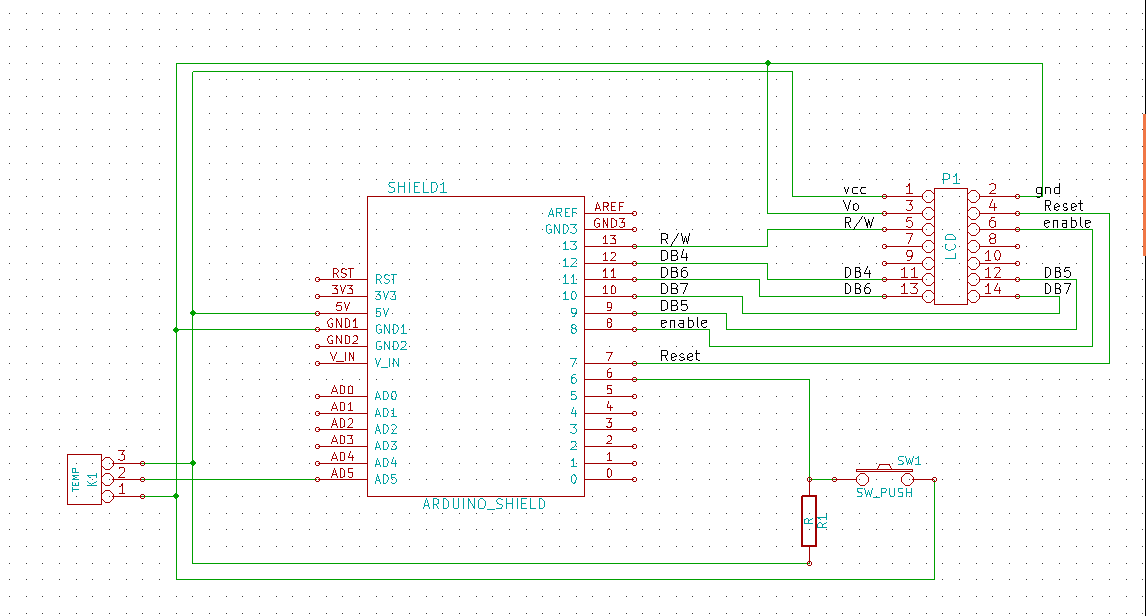
2. Download test program into the Arduino board. Download Here
3. Press the push button to read and display temperature value. If everything works, you can see how hot it is now.
Writer : Ataya P
Recently I'm working with new project using Arduino. First step, I need to able to show reading values from sensors. So, I designed to connect cheap LCD module with my Arduino Uno board.
Hardware:
Character LCD Module SC1602BSLB
Push Switch
Temperature Sensor LM61
Arduino Uno board
Detail
1. Connect LCD module,switch and Temperature sensor with Arduino Uno as you see in the schematic image below.
3. Press the push button to read and display temperature value. If everything works, you can see how hot it is now.
- ataya_p's blog
- Login to post comments

Custom Search
 English
 日本語
日本語 ภาษาไทย