Comic
Fay's Diary Comic
Kanji Transformer Series
Our Android Apps
Paper Toy
Animation
Dharma Cartoon
Figure Photo Collection
Flash Game
Embedded Systems
Old Work
Toy & Gadget
Game & Software
About Us
Links
Ataya's Embedded Systems Blog
Green Tea Story
Play with BeagleBoneBlack
Studio Wallpaper
Studio Wallpaper
The Sky Flower & The Temple Dog
Date : Sunday,28 May 2017
Writer : Ataya P
Just bought new Arduino Leonardo board from Akihabara. So, I just did unboxing video and testing it's special HID(Human Interface Device) function with buttons mouse example. Let's take a look ...
Hardware:
Arduino Leonardo board
5x Push switches
5x 10K Ohm resistors
Breadboard and a lot of wires
Detail
1. Wiring push buttons with Arduino Leonardo as you can see in the image below.(Image from Arduino's official website)
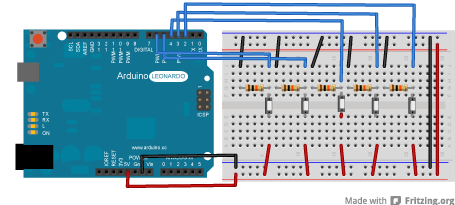
2. Download test program into the Arduino board by run the Arduino IDE and select Arduino Leonardo first then choose File > Examples > 09. USB > Mouse > ButtonMouseControl
3. After download program, now you can control you PC with your push buttons. Have Fun :)
Reference
https://www.arduino.cc/en/Tut
Writer : Ataya P
Just bought new Arduino Leonardo board from Akihabara. So, I just did unboxing video and testing it's special HID(Human Interface Device) function with buttons mouse example. Let's take a look ...
Hardware:
Arduino Leonardo board
5x Push switches
5x 10K Ohm resistors
Breadboard and a lot of wires
Detail
1. Wiring push buttons with Arduino Leonardo as you can see in the image below.(Image from Arduino's official website)
3. After download program, now you can control you PC with your push buttons. Have Fun :)
Reference
https://www.arduino.cc/en/Tut
- ataya_p's blog
- Login to post comments

Custom Search
 English
 日本語
日本語 ภาษาไทย