Comic
Fay's Diary Comic
Kanji Transformer Series
Our Android Apps
Paper Toy
Animation
Dharma Cartoon
Figure Photo Collection
Flash Game
Old Work
Game & Software
About Us
Links
Ataya's Embedded Systems Blog
Green Tea Story
Green Tea Story
Play with BeagleBoneBlack
Studio Wallpaper & Sticker
Studio Wallpaper
Studio Wallpaper
The Sky Flower & The Temple Dog
Date : Monday,25 July 2016
Writer : Ataya P
After did a research for a while, I finally can run LatticMico8 soft microcontroller on the machXO2 breakout board !! Let's see how to do it.
Working Platform :
Lenovo Notebook , Intel Pentium Dual Core T2080 1.73GHz
2Gbyte RAM
Ubuntu Ubuntu 12.04.3 LTS
Details
1. Get LMS and tutorial from
http://www.latticesemi.com/...
2. Alien them to make it runnable on Ubuntu.
# alien -g --scripts diamond_3_4-lm-80-i386-linux.r
3. cp micosystem dir to diamond dir
# cp micosystem/ /usr/local/diamond/
4. install libstdc++5 and pearl XML::DOM
# apt-get install libstdc++5
# perl -MCPAN -e 'install XML::DOM'
5. Do as the tutorial says. Which is follow these processes.
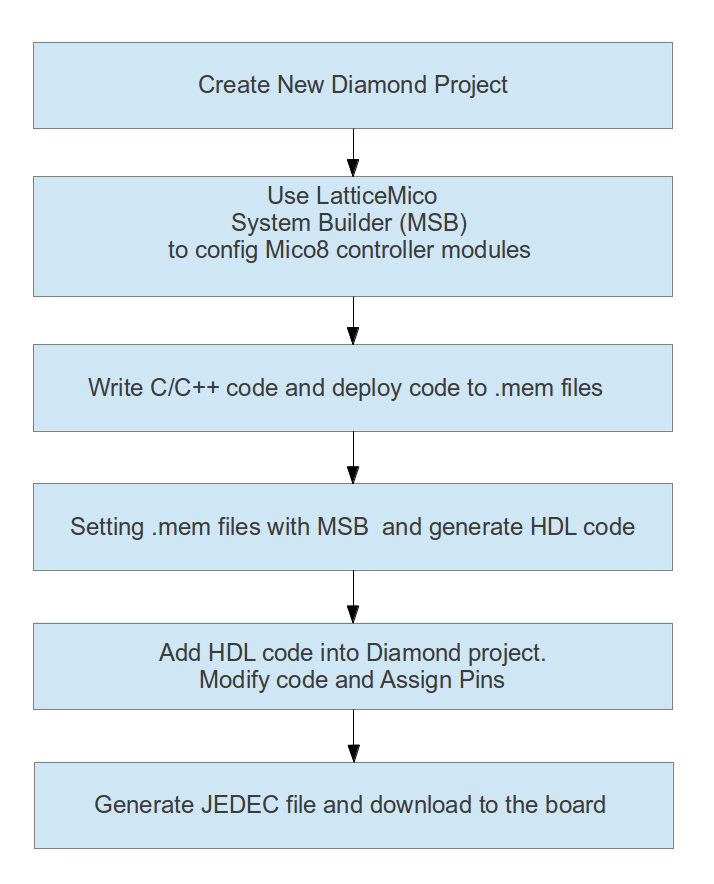
There are 3 tools here you have to learn how to use them ...
Lattice Diamond

Lattice MSB
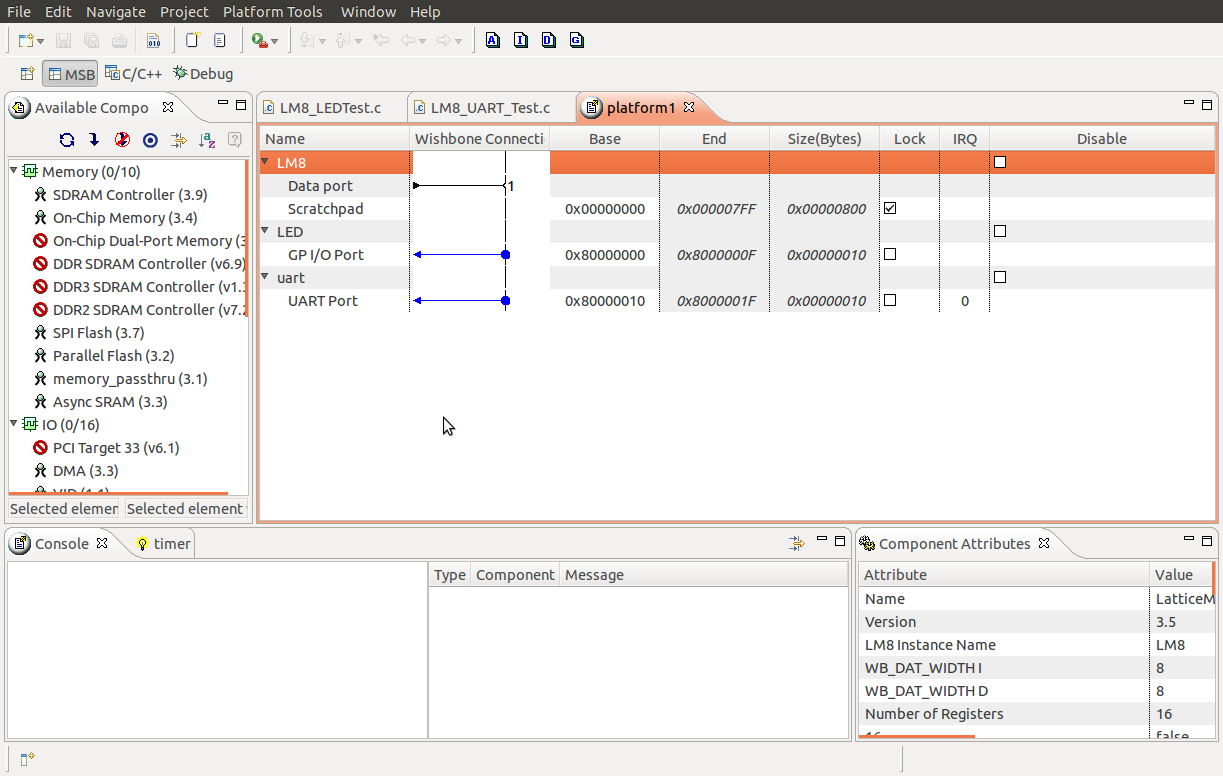
C/C++ SPE

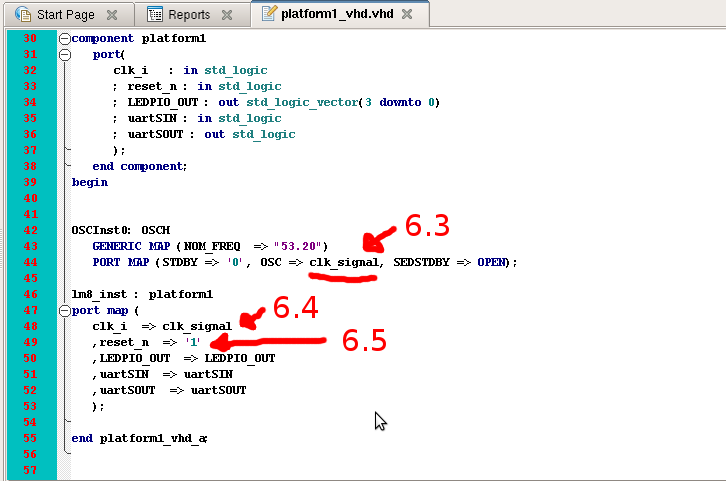
6. After added HDL code into Diamond, modify code at platform1_vhd.vhd to using internal osilator.
6.1) comment out clk_i port.
6.2) add OSCH component and clk_signal signal.

6.3) map clk_signal into OSCH component.
6.4) map clk_signal to clk_i port in platform1 component.
6.5) just map reset_n pin to '1' (Because we don't want to connect with physical reset switch)
7. Map pins with LEDs then gererate JDEC file and download it into the board.
If everything is alright. Then the LEDs should run like you see in the video. Enjoy !!

Writer : Ataya P
After did a research for a while, I finally can run LatticMico8 soft microcontroller on the machXO2 breakout board !! Let's see how to do it.
Working Platform :
Lenovo Notebook , Intel Pentium Dual Core T2080 1.73GHz
2Gbyte RAM
Ubuntu Ubuntu 12.04.3 LTS
1. Get LMS and tutorial from
http://www.latticesemi.com/...
2. Alien them to make it runnable on Ubuntu.
# alien -g --scripts diamond_3_4-lm-80-i386-linux.r
3. cp micosystem dir to diamond dir
# cp micosystem/ /usr/local/diamond/
4. install libstdc++5 and pearl XML::DOM
# apt-get install libstdc++5
# perl -MCPAN -e 'install XML::DOM'
5. Do as the tutorial says. Which is follow these processes.
There are 3 tools here you have to learn how to use them ...
Lattice Diamond
Lattice MSB
C/C++ SPE
6. After added HDL code into Diamond, modify code at platform1_vhd.vhd to using internal osilator.
6.1) comment out clk_i port.
6.2) add OSCH component and clk_signal signal.
6.3) map clk_signal into OSCH component.
6.4) map clk_signal to clk_i port in platform1 component.
6.5) just map reset_n pin to '1' (Because we don't want to connect with physical reset switch)
7. Map pins with LEDs then gererate JDEC file and download it into the board.
If everything is alright. Then the LEDs should run like you see in the video. Enjoy !!
- ataya_p's blog
- Login to post comments

Custom Search
 English
 日本語
日本語 ภาษาไทย